What kind of event are you running?
We'll lead with what matters most for your event. You can change it anytime.
This is the judge's seat.
The actual scoring screens your judges will use. Your custom rubric becomes an intuitive 10-point scale with exact element weighting, in increments of 0.5, 0.25, or 0.1.
Slider mode
Precise, deliberate scoring after each performance.
Heads-up mode
Choose tap buttons or deduction blocks to score while looking up. Never miss a moment.
Switch on the fly
Judges can change modes at any time, mid-event.
One scale, no confusion
Add any number of criteria to an element so judges have a road map while scoring.
A bigger seat.
All the same features.
Hand a judge any tablet in landscape and LiveJudge opens a larger judging layout. Every element sits in a rail with its running subtotal, and the open element fills the screen with bigger sliders and room to read the guidance.
Turn it sideways
Any tablet in landscape gets the larger layout. Nothing to install or switch on.
All the same features
Slider and heads-up modes, written guidance, the same weighting and the same math.
Next, not back
Previous and Next buttons on every element, so heads-up judges never hunt for the list.
Preview it first
Tap Tablet View in Class Studio to see exactly what your judges will see.
Judges talk. Contestants read.
A judge taps the mic and says what they saw, while it is still fresh. LiveJudge writes it down, files it against that entry, and hands the contestant a readable memo after the event.
Speak, don't type
Tap the mic and talk. The words appear as they are spoken, with a running timer and a stop button. Typing works the same way.
It becomes a memo
Spoken comments come back as clean written notes, so contestants get the reasoning behind their score, not just the number.
Admin-only when you want
One toggle keeps a note off the contestant's copy. Leave it off and the memo is theirs to read.
Filed, stamped, editable
Every memo is attached to that contestant, entry and round, timestamped on save, and the judge can still edit it.
A kind judge's 7.5 is not a grumpy judge's 7.5.
The judging screen shows 1-10 sliders for each evaluation criterion. Look at the difference between a bare 1-10 slider and a "judge guided" version of the same slider.
Without judge guidance, two judges evaluating the same thing might land on wildly varying scores.
Band 4 of 6Confident and well paced, with a couple of wobbles.
Both judges are reading the same sentence, so both land in band 4. They still do not agree exactly, and closing that last gap is what normalization is for.
Put two judges in front of a bare 1 to 10 scale and they are not using the same scale. One rewards the effort, one marks against perfection, and the same entry comes back a 9 and a 6. Neither of them is wrong. Nobody ever told them what a 7.5 is.
So LiveJudge tells them, on the screen, while they score. Any criterion can carry six written bands in your words, and the guidance under the slider rewrites itself the moment the score crosses into the next one. Both judges read the same sentence before either of them commits a number.
That pulls a panel together at the source, before a single algorithm runs. Normalization still has your back afterward. It simply has far less left to fix.
Six bands, your words
Write what a 4 looks like and what a 9 looks like once, in the rubric builder. Judges score against your definition instead of their own.
It rewrites as they score
Move the slider and the sentence underneath changes to the band the score just landed in. Every criterion carries its own.
No calibration meeting
A judge who has never seen your rubric reads the standard while scoring it. A last-minute replacement on the panel stops being a problem.
Then the math runs
Anchored marks arrive closer together, so normalization and high/low drops are correcting a smaller gap, not rescuing the result.
Bring your rubric. Or let AI write one.
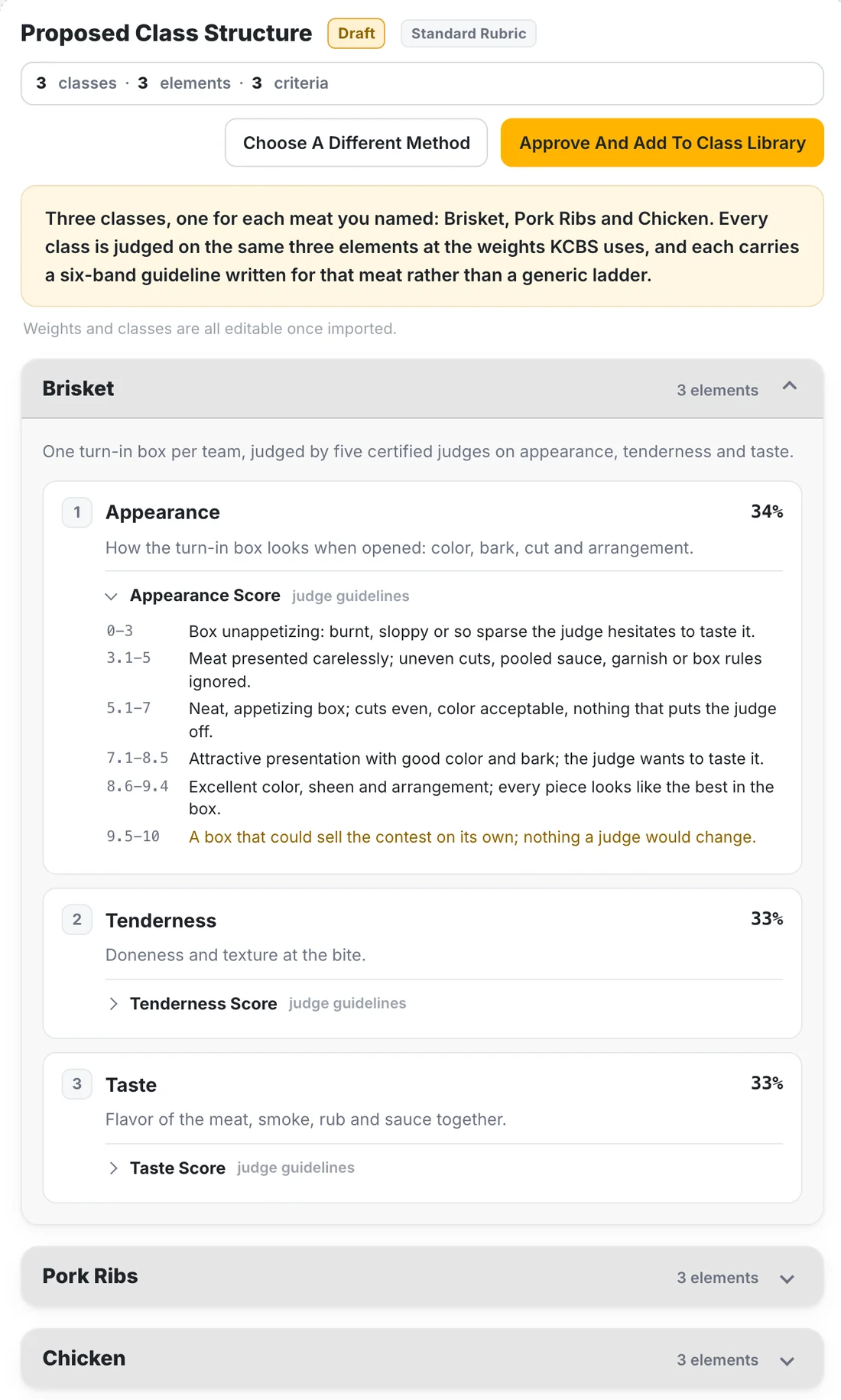
No retyping a score sheet line by line. Pick one of three ways in, and every one ends the same place: classes, weighted elements and criteria, each carrying six bands of judge guidance, ready in your class library.
Upload your rubric
Send the score sheet you judge with today: a PDF, a photo of the paper, a spreadsheet or a Word file. LiveJudge reads it and builds your classes from it.
Build one from scratch
No rubric yet? Describe your event in a few sentences. The AI asks a few quick questions, then drafts the whole thing, guidance included.
Start from a template
Car shows, pageants, science fairs, cook-offs and two dozen more, built by LiveJudge. Pick the closest one and change anything you like.
You see the draft before anything is saved. Ask for changes in plain words, and approve it when it reads right.
100% flexible. Complex or simple, your call.
Whether it is a business pitch competition, a pet show, or a multi-class regional dance championship, the rubric builder puts everything in one place with no learning curve. In two minutes, you go from sign-in to testing your first event.
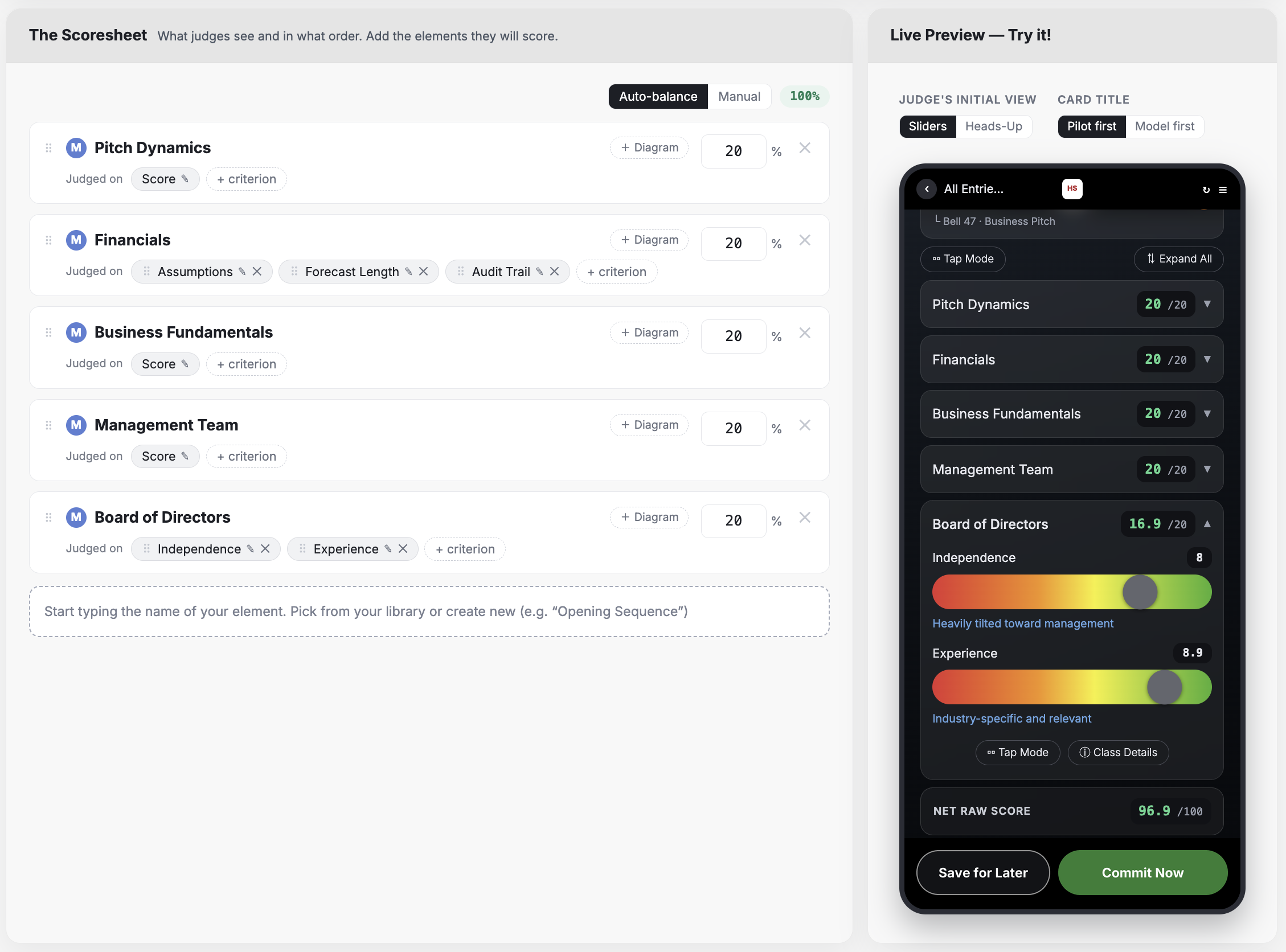
Custom everything
Complex or simple rubrics with custom classes, elements, standards, and weighting.
Normalize & Scale
Choose from four professional normalization methods and three scaling options to bake out bias and deliver fairness and consistency to contestants.
Electives & Difficulty Factors
Built-in library with difficulty factors and descriptions. Contestants pick from a simple screen and it just works.
Dynamic Judge Guidance
Every evaluation criterion can have guidelines that help the judge assign a numeric score.
Live Preview
Visualize and test your rubric live as you build it right on the same screen, or scan a QR code and test live on your phone!
Built for Human Judges
Judges intuitively understand consistent 1-10 scales. That's what they see. Behind the scenes, your rubric (no matter how complex) works exactly like you want it to.
One platform for individual or entry-based events.
If it involves judging, fan voting, or both, LiveJudge runs it.
Four of these have a page of their own: pitch and academic competitions, science fairs, car, motorcycle and RC shows, and dance and performance.
Draw your audience in further.
Your event gets a branded home screen and its own QR code. Your entire audience, worldwide, can see every document, profile, entry, and live score (if you show it) on their devices. No app, no equipment. No paper.
Spectators
Follow live scores and standings, browse every contestant, deck, and profile, and vote on ballots.
Contestants
Self-register for classes, manage entries, customize a profile.
Judges
Sign in with a phone and start scoring in seconds.
Messaging
Admins can text judges and contestants directly.
Entry tags
Print QR sheets for instant access for judges or voting fans.
No fancy equipment
No networks, no cables. Everyone uses their own device.
Real-time fan voting, on your terms.
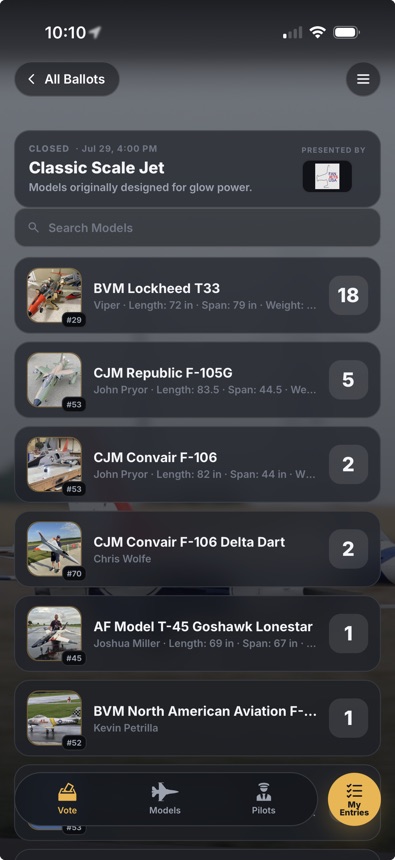
Open ballots to everyone in the room. Fans vote from their own phones, results update live, and you decide exactly how much their voice counts.
Live voting
Create an unlimited number of voting ballots, either for individuals or entries.
Geo-fencing
Limit voting to those present within a radius as tight as .25 miles from your venue.
Composite awards
Combine audience votes with judge scores at custom weighting, to award contestants who shine with judges and fans.
More votes
Set ballot rules to allow fans to cast more than one vote in any ballot.
No matter the contest type, LiveJudge scores big.
Thanks for a great piece of software. Our IRCHA Cup series needed a standardized way to judge and score events, and LiveJudge was the answer.
The LiveJudge platform was essential to ensuring a smooth and engaging experience for both our judges and participants.
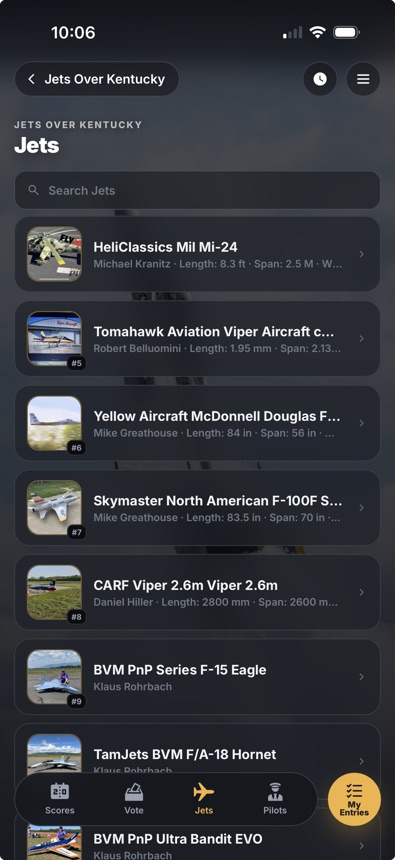
LiveJudge was a game-changer for our live voting. Our fans and pilots loved the jet photos and specs.
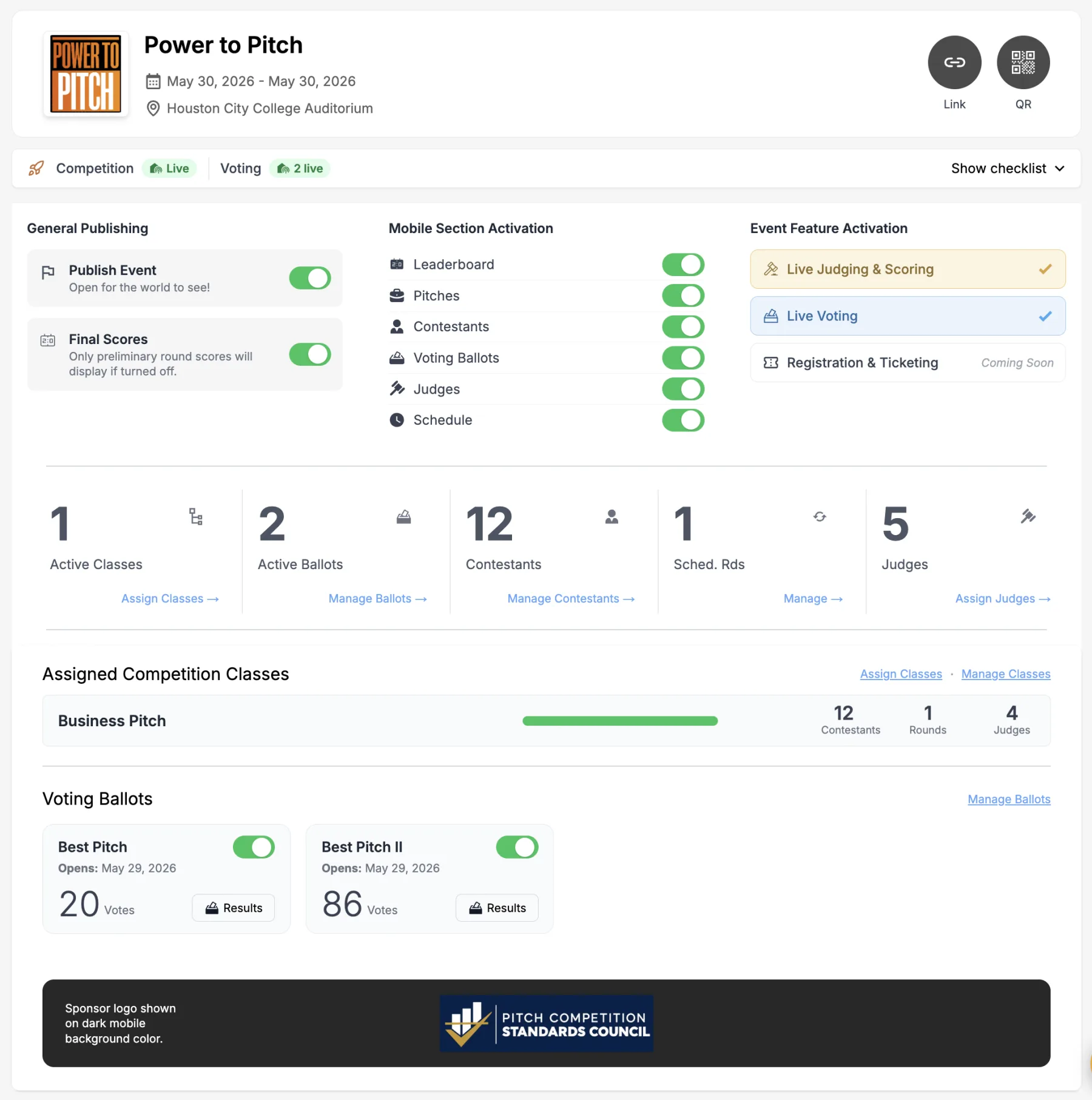
Command and Control
Your dashboard gives you an instant overview of your event with round progress indicators, entrant stats, ballot counts and more.
Total freedom, no loss of rigor.
Set any rubric you like. LiveJudge honors it exactly, then normalizes results so a strict panel and a lenient one land fairly, scales them your way, and exports a full audit trail for every score.
Normalize to kill bias
Raw average, high/low drop, Z-score, and Olympic-Z.
Scaling for uniformity
Absolute (1 to 100) or top-pinning, where the winner always gets 1,000.
Multi-round scoring
Sum or average across rounds, your call.
Guaranteed advancement
Top X contestants advance after round Y, automatically.
Judge 4 grades everyone hard. Every opinion counts equally here, which drags this contestant down.
Happy contestants are return contestants.
If competitors think your scoring is unfair, slow, or clunky, your event's reputation suffers. LiveJudge was designed for contestants of every type.
Entries anywhere
Contestants add entries on the fly, or you enter them from the console. Once in the system, an entry can be reused in any event you host.
Easy registration
Contestants self-register for competition classes and voting ballots.
Invite-only
Close self-registration and import or add contestants individually.
Individual events
Events with no entries are even simpler to run.
Team registration
Teams register as individual athletes and combine into a team, or register as a single unit.
Printable entry tags
Print entry tags with optional QR codes, in batches or one at a time.
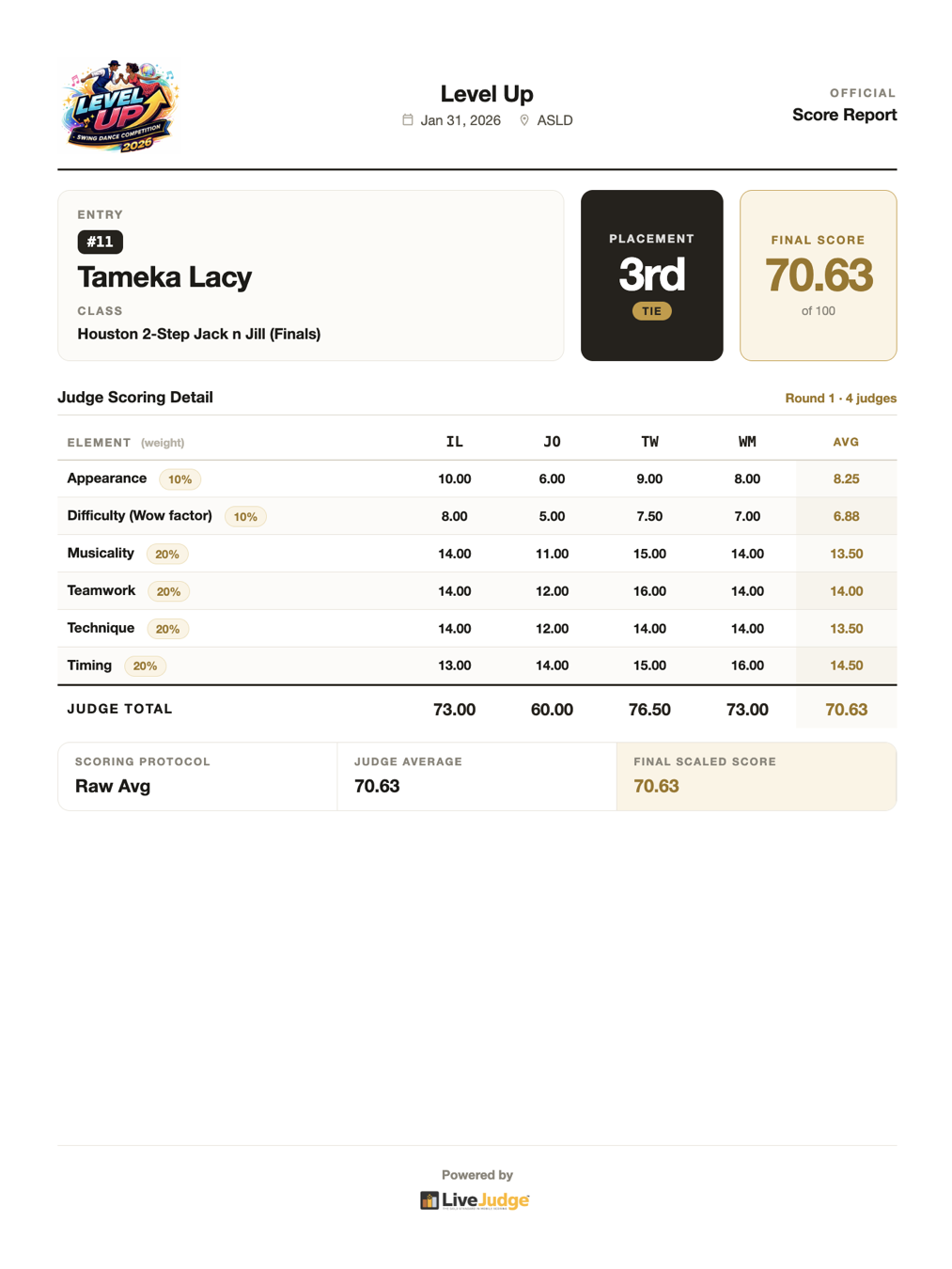
Results go final. The paperwork is already done.
The moment results are final, every entry has an official, print-ready score report: placement, final score, and each judge's marks broken out element by element.
Contestants print from their phone
One tap on their entry produces the official sheet. No lines at the admin table.
Admins print anything
Any contestant, any class, any round, printed on-site in seconds.
Full scoring export
Download complete detail for the entire event: every judge, every element, every score.
Dispute-ready
An auditable record for every result, exactly as contestants and admins print it.
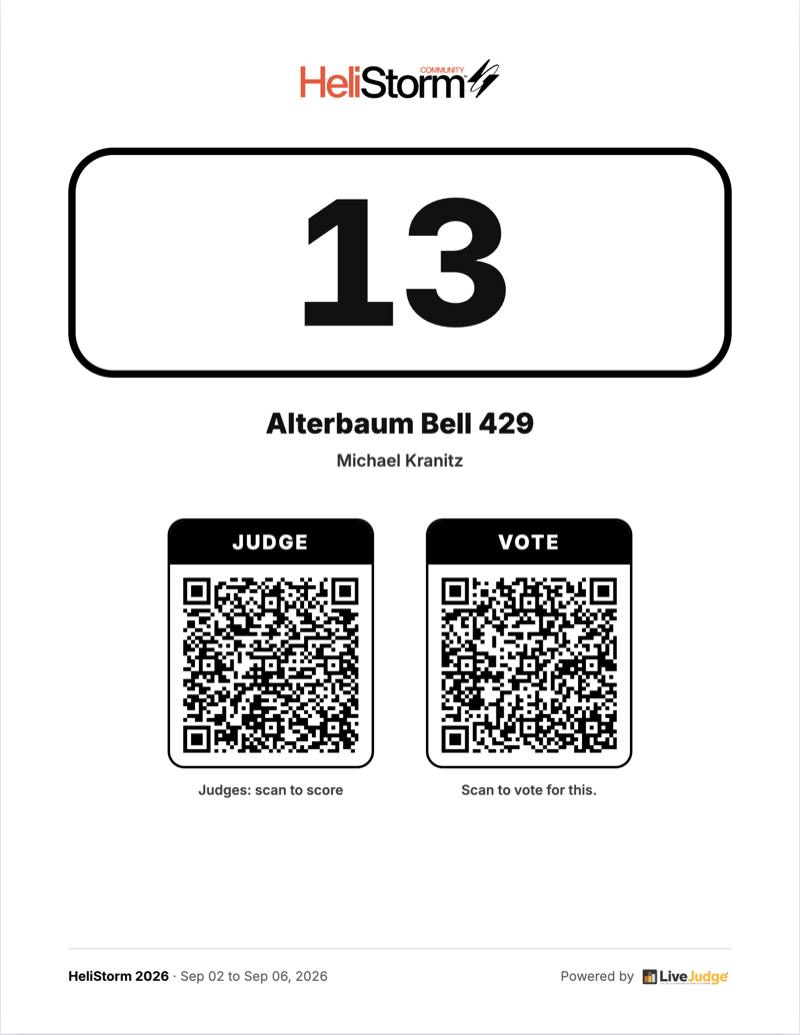
The fastest path to any entry.
Print tags with QR codes that instantly open the scoring or voting view for that specific entry. No searching required.
Judge scan
Judges scan a tag and jump straight to that competitor's scoring screen.
Spectators
Fans, and fellow contestants if you allow it, scan the voting QR to cast a ballot.
Automatic numbering
LiveJudge numbers your contestants and prints full batches or single sheets.
Branded
Every entry tag carries your event logo.
Every event gets a website. Free.
Pick a look, drop in your photos, and publish at yourevent.livejudgesite.com. The countdown, the stat band and the QR into your event app come wired.

It starts half built
Your name, dates, city and counts come over from LiveJudge. Hand it a flyer and AI drafts the rest.
Style, not code
Brand color, fonts, hero photo, section height and blend. Every choice is a control, and the preview is the page.
It walks the room in
Every page carries an Open Event App button and a floating QR, routed to your LiveJudge event.
Included with LiveJudge, and your site stays live for a full year.

Thirty years of building software that solves real problems.
Michael Kranitz is a serial software entrepreneur of thirty-plus years, with nearly 15 of them leading an event software company serving government, education and corporate customers. He has sold companies to Microsoft, Ford, Hearst, MediaNews Group, HotelPlanner, Internet Brands, and Navidec.
He did not set out to sell LiveJudge. He built it to score HeliStorm®, his own nonprofit event and the world's largest scale radio control helicopter event, because nothing on the market could. You can now leverage those thirty years at your next event.
One platform. The whole toolkit.
From the first rubric to the final printout, LiveJudge is the last and only platform you will need to run your competition.
Rubric & Scoring
- Fully custom rubrics, or start from a template
- AI Class Builder: upload a rubric or describe the event
- Shared element library, build once, reuse
- Weighted criteria, auto-balanced to 100
- Custom score scales & increments
- Multi-round formats with score carry-over
- Advancement cuts & guaranteed rounds
- Electives with difficulty factors
- Overall & multi-round awards
- Per-element reference diagramsSoon
The Judge's Seat
- Score from any phone, no gear
- No-password sign-in (text code or Judge ID)
- Color-graded sliders or heads-up tap
- Live per-element judge hints
- Flexible completion: all judges, or N-of-M
- Multiple head judges per class
- Voice notes, type or talk
- Editable feedback with audit trailSoon
- Private, admin-only notes
Fairness, Results & Reports
- Four pro normalization methods
- Bias-controlled, defensible scoring
- Automatic high/low judge drop
- Automatic tie detection & labeling
- Ranked standings with margins
- Hide results until round or event closes
- One-page printable score reports
- Per-round, per-judge, per-element detail
- Contestants print from their phone
- Full scoring & results CSV export
Audience & Fan Voting
- Real-time fan voting
- Contestant & entry profiles with photos/specs
- Composite awards: judge scores + fan votes
- Spectator or contestant ballots
- Vote limits stop ballot-stuffing
- Geo-fenced voting radius
- Results: live, on close, or hidden
- QR voting, no app to install
- Multiple sponsor-branded ballots
Registration & Check-in
- Contestant self sign-up from phone
- Individual or team registration
- Invite-only entry control
- Automatic entry numbering
- Printable, branded entry tags
- QR entry-scan for judges
- Paid registration & ticketingSoon
- Mobile checkout & receiptsSoon
- Register on behalf of a childSoon
- QR check-in deskSoon
Admin & Command
- Multi-org management, fast switching
- Your own terminology & event type
- Branded public page, custom URL
- Event, org & sponsor logo branding
- Admin roles & super-admin controls
- One-tap go-live publishing
- Pre-launch readiness checklist
- "Test on your phone" event QR
- Broadcast messages to your judges
- Assign judges across every class
The difference, at a glance.
What running a fair, scored event actually takes, and what it takes with the tools most hosts reach for first.
| What it takes to run a scored event | LiveJudge | Paper & clipboards | Spreadsheets |
|---|---|---|---|
| Score from any phone, no equipment | ✓ | — | — |
| Fully custom, weighted rubric | ✓ | By hand | DIY |
| Four bias-normalization methods | ✓ | — | — |
| Automatic high/low drop & tie handling | ✓ | — | Manual |
| Multi-round with score carry-over | ✓ | By hand | DIY |
| Live standings as judges score | ✓ | — | — |
| Real-time audience fan voting | ✓ | — | — |
| Contestant & entry profiles with photos/specs | ✓ | — | — |
| Composite awards: judge scores + fan votes | ✓ | — | — |
| Geo-fenced, stuffing-proof ballots | ✓ | — | — |
| Branded public event page + QR | ✓ | — | — |
| Instant printable score reports | ✓ | — | DIY |
| Dispute-ready audit trail + CSV export | ✓ | — | Partial |
Ready to level up your event?
Free up to 10 contestants, then $3.49 per contestant, plus 2.5% of what you sell through our checkout. No subscriptions, nothing to download.
- Unlimited judges, admins & spectators
- Access to all features
- Fan voting with sponsored ballots
- Upload your rubric or have our AI make one
- Voice-to-memo judge feedback
- No passwords or downloads
- Public event schedule
- Text messaging to judges & contestants
No subscriptions · no credit card required
- Same price however they get in: imported, added by hand or registered online
- Teams count one per member, no team price
- Never more than $299 for one event
- Billed once, after the event, to your card on file
- Refunded contestants are not counted
- Judges, co-hosts, admins & spectators never counted
A 60-contestant event is $209.40
- Entries, add-ons, merchandise and spectator tickets
- Taken from each sale, nothing to pay later
- Money goes directly from the registrant to your Stripe account. We do not delay your payments.
- Refund a sale and the fee goes back with it
- Free entries and free tickets: nothing
- Separate from the card processing Stripe charges you
A $200 entry pays $5.00
This pricing applies to every event held on or after October 10, 2026; events held before that date are free. Fan voting: the first 100 votes at every event are free, then $0.10 a vote, billed after the event. Contract pricing is available for extended agreements.
The stuff swirling around your brain right now.
Do attendees, contestants, and judges have to download an app?
No. LiveJudge runs in any phone browser. Judges, contestants, and fans open a link or scan a QR code and they are in. There is nothing to install and nothing to update.
My competitors and judges will never remember passwords.
They don't need to. Sign-in is by SMS code, so there are no passwords to forget. A judge enters a phone number, taps the code, and starts scoring.
How do I get started?
Sign in, build your event, and start testing. Most hosts go from sign-in to a working test event in about two minutes. Events with 10 contestants or fewer are free with every feature, so testing costs nothing.
Can you help us set up?
Yes, though you may not need us. The AI Class Builder turns the score sheet you already use (a PDF, a photo of the paper, a spreadsheet or a Word file) into classes, weighted elements and six bands of judge guidance. No rubric yet? Describe your event and it drafts one, or start from a ready-made template for car shows, pageants, science fairs, cook-offs and more. While you build, What to Do Next checks your setup for anything still missing and offers AI advice on getting more out of it, and the AI assistant in your console answers questions using your own event setup. And if you would rather hand it to a person, send us your scoresheet and we will build it for you for free, then walk you through your first event.
What is your pricing model?
Pay-as-you-go, with no subscriptions and no credit card to start. Events with 10 contestants or fewer are free. Bigger ones pay $3.49 per contestant, never more than $299, plus 2.5% of what you sell through our checkout. Full detail is on the pricing page.
How do contestants enter events and competition classes?
Contestants self-register for classes and ballots, or you import and add them from the console. You can also run invite-only events. Entries added once can be reused across any event you host.
Can we get a live demo?
Yes. Schedule a demo and we will walk you through the console, the judge's seat, and the fairness engine on your own event type.
Will we need WiFi?
No dedicated network required. Judges, contestants, and fans use their own devices and their own connections. No routers, no cables.